 Marriage Point Calc
Set up the game before the first deal
Press ⌘N to start a game for 2–12 players. Enter their names or load a saved group, choose Murder or Kidnap, and select the dealer. Set your table’s points for players who have seen or haven’t seen, enable Dublee or Foul if your group uses them, and choose a point rate and currency if you want to see converted totals.
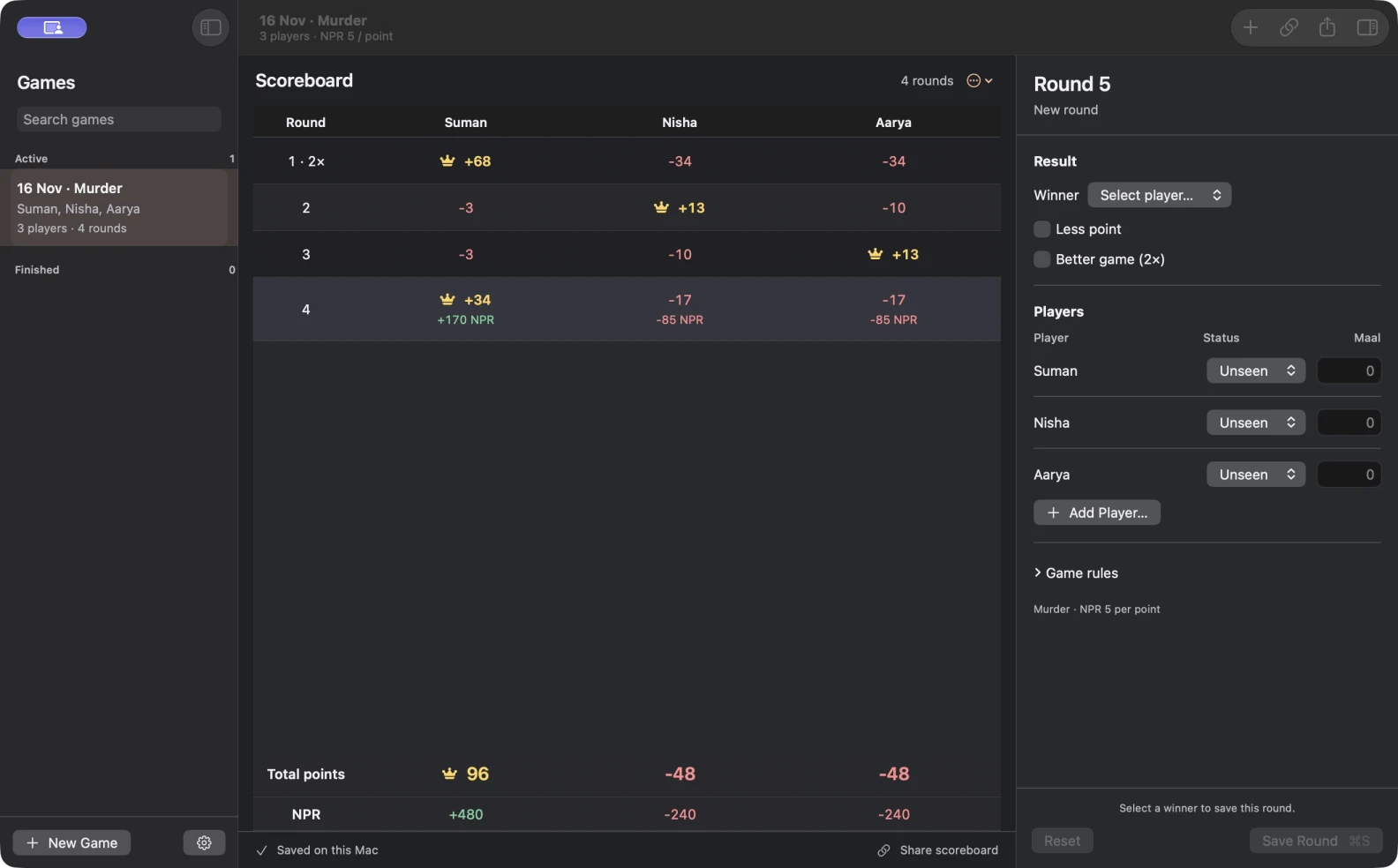
Record a round and check the totals
In the round editor, choose the winner, set each player’s status, and enter their Maal. Apply Less point or Better if the round calls for it. Press ⌘S to save. The scoreboard adds the round and displays running point totals alongside the currency conversion.
Suppose someone remembers an unrecorded Maal after the next deal. Click the saved round number, update that player’s Maal, and save. The app recalculates the later rounds using the corrected entry. If you already have an unsaved round in the editor, save or reset it before opening the older round.
Pause the game or share the board
Leave an unfinished game in the sidebar to resume it later. Once the table is done, finish the game to move it into your history. Press ⌘F to find a game by player, date, or game type.
You can keep score offline without an account. When you have an internet connection, create a live scoreboard link so friends can follow along in a browser. The shared view is read-only, and your editable games and saved groups stay on your Mac.
Get Marriage Point Calculator for Mac
The native app requires macOS 14 or later and has an English interface.